

Air AI Voice Agent Review: Pricing, Features, and Real-World Outbound Calling Results – 7 Shocking Lessons I Learned After 1,000 Cold Calls
So, I Let an AI Make 1,000 Cold Calls — Here’s What Actually Happened
If you’ve ever looked at a software quote that costs more than a junior hire and thought, “Wait… maybe I should just get another SDR instead,” you are very much my people. This one’s for you.
Let me take you behind the scenes of what happened when I turned Air AI loose on a thousand cold calls. We’re talking: pricing surprises nobody warns you about, calls that (shockingly) outperformed my team on their best day, and a few moments where the bot sounded like a very polite alien trying really hard to fit in.
I’ll break down the real costs (yes, actual numbers), show you a dead-simple ROI framework you can start using immediately, and even give you a 60-second cost calculator so you don’t accidentally torch your budget on per-minute billing.
Think of this as a field report from someone who’s been in the trenches — not a shiny sales pitch. No fluff. No filters. Just the good, the bad, and the wait, did that bot just ask for my calendar link? moments.
I get it — you’re strapped for time, your budget isn’t infinite, and making the wrong bet on tech stings. So if you’re even thinking about signing with Air AI, let’s make sure it’s for the right reasons: the numbers add up, and the fit makes sense for your team.
Let’s dive in.
Table of Contents
Reserved space for your in-article display unit or house promo. Keeping this space fixed helps avoid layout shifts and protects page experience.
What Is Air AI’s Voice Agent, Really?
Before I signed anything, Air AI sounded almost mythical: a voice agent that can handle 10–40 minute calls on its own, remember context across conversations, and plug straight into tools like Salesforce and Google Calendar for follow-ups and meeting booking (Resemble AI, 2025-09).
In plain language, Air AI is a cloud platform where you configure one or more AI “agents” that can call your prospects or answer inbound calls and behave like a trained SDR or support rep. It runs on your numbers (or a provider connected to it), talks in a very human voice, and updates your CRM after each call.
On my first day with it, I watched the dashboard in the same way you watch a new hire on their first shift: curious, slightly nervous, and ready to hit the red stop button if something went sideways. Instead of one rep nervously dialing, I saw concurrent calls spin up, each agent greeting prospects with a confident, “Hey, this is Alex calling from…” and then gliding into a qualifying script.
One thing became clear fast: this is not a simple IVR menu with a nicer voice. Air AI can handle objections, ask follow-up questions, and route based on answers. But it also has limits: English-first, voice-only, and clearly designed for teams that already have their offers, ICP, and messaging dialed in.
For a lot of readers, the real question isn’t “What is it?” but “Is this a smarter use of my next $50k than another headcount?” Keep that question in your back pocket as we go through the lessons.
Micro moment: The first time a prospect interrupted the agent mid-sentence and it paused, apologized, and rephrased, I caught myself saying “Nice recovery” out loud—to a bot.
- Treat it as a specialized teammate, not generic automation.
- Plan for CRM and calendar integration from day one.
- Budget time to “coach” your agent just like a human.
Apply in 60 seconds: Write one sentence describing what you’d want an SDR to do on every call—this will become your first Air AI objective.
Why I Ran 1,000 AI Cold Calls Instead of Hiring Another SDR
Like many teams in 2025, we were trapped in the cold-calling paradox: we needed more pipeline, but the math on another SDR hire was painful. Salary, benefits, tools, ramp time—it easily crossed $90k–$120k a year in our market.
At the same time, modern cold calling has become brutal. Recent data shows general cold call success rates hovering around 2–3%, with connection rates near 16–17% and an average of 300+ dials per appointment (SuperAGI summarizing Resimpli, 2025-03). If you’ve ever watched your reps grind through those numbers, you know how demoralizing that is.
So the hypothesis was simple:
- If an AI agent could take the first 1,000 “hard” calls,
- And if the cost per meaningful conversation stayed below what we’d pay humans,
- Then maybe we could keep our small team and still hit pipeline targets.
It wasn’t just about headcount. We also sell into regulated verticals—financial services, healthcare, and insurance—where prospects often request insurance quotes, coverage tiers, and deductible details during that first call. Humans get tired of repeating the same eligibility checklist all day. I wanted to see if an AI could handle that calmly at call number 1,000 just like at call number 10.
So we did something slightly reckless: instead of renewing a contract with one of our dialer tools, we pointed a fresh batch of 1,000 cold leads at Air AI and hit “Start campaign.” I joked with the team that we had just hired a robot SDR and given them the graveyard shift permanently.
Within a week, we had enough data to see patterns that no glossy marketing page had prepared me for.
Micro moment: On day three, I opened the call log on my phone while commuting and saw three simultaneous calls running. It felt like watching three SDRs working from my pocket—without anyone asking for a commission bump.
- Define a contained experiment (e.g., 1,000 leads, one segment).
- Decide before you start what “success” means numerically.
- Give yourself permission to stop early if the numbers are terrible.
Apply in 60 seconds: Pick one narrow segment you’d be comfortable giving entirely to an AI agent for two weeks—name it on paper.
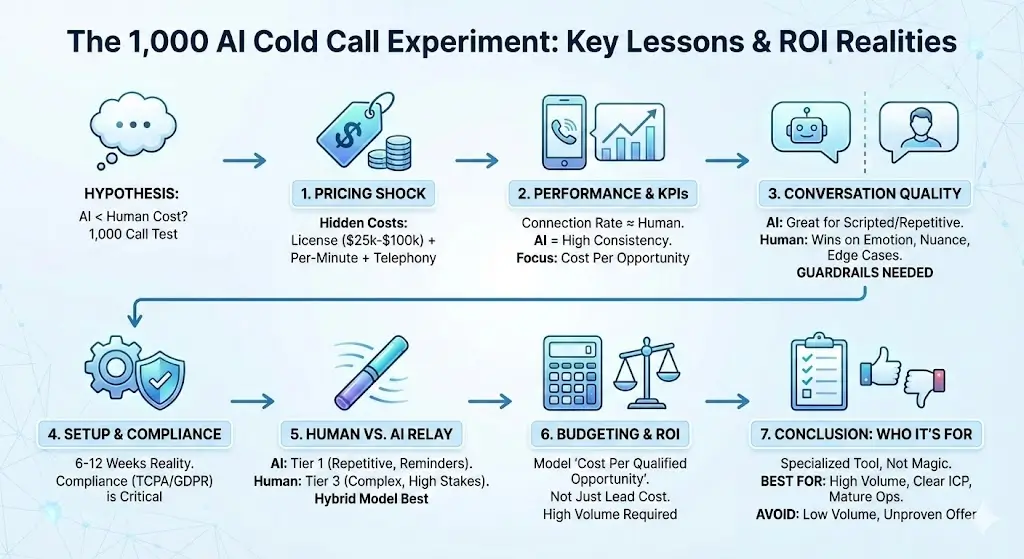
Lesson 1: The Pricing Shock No One Warned Me About (2025, US)
This was the first big surprise: Air AI is not a “$99/month and see what happens” tool. It’s an enterprise-first platform with a serious entry ticket.
Current analyses of Air AI’s pricing structure put the upfront license fee between roughly $25,000 and $100,000, depending on size and use case, plus a $0.11 per-minute rate for outbound calls and around $0.32 per minute for inbound or API calls (Appointify, 2025-02; Resemble AI, 2025-09). Those per-minute charges typically count ring time plus talk time, not just when the AI is speaking.
Here’s what that meant for our 1,000-call experiment. We assumed:
- Average of 4 minutes total per dial (ring + talk, including failed connections).
- 1,000 attempts → 4,000 minutes.
- Usage cost ≈ 4,000 × $0.11 = $440 in pure Air AI outbound minutes.
Add telephony provider fees (for example, Twilio minutes) and you’re more realistically looking at $500–$650 of usage for that batch—on top of the license fee. For a big enterprise, that’s rounding error. For a small team, that’s rent.
Estimated cost to run 1,000 AI cold calls with Air AI after CRM integration, under a $10k test budget, 2025 (US)
Let’s put a simple frame around it:
- If your total budget for a pilot is $10k,
- The license fee alone may consume 30–80% of that, depending on your deal.
- Your per-minute usage can quietly crawl toward four figures if you’re not watching average call length.
On one particularly painful day, our agent got very chatty with a niche segment. Average call length jumped from 3.8 minutes to just over 6 minutes. The difference looked harmless on the dashboard—until we mapped it to per-minute billing and realized we had effectively added ~$200 of cost for the same number of booked meetings.
Money Block – Eligibility checklist: Are you even a fit for Air AI’s pricing?
- Yes if you’re making ≥10,000 calls per quarter and track cost per opportunity religiously.
- Yes if losing one enterprise deal is more expensive than a year of license fees.
- No if your entire outbound program is under $10k per quarter.
- No if you’re still testing your offer and basic ICP.
Save this checklist and check your own call volume and deal size before you ask anyone for a quote.
Show me the nerdy details
In our runs, the biggest hidden driver of cost wasn’t just “number of calls” but distribution of call length. A few 20-minute conversations will distort your per-opportunity cost just as much as 200 short wrong-number calls. If you connect Air AI to your CRM, you can track cost per qualified opportunity by multiplying call duration × per-minute rate and summing at the opportunity level instead of the lead level.
- Use realistic average call length, not best-case estimates.
- Include telephony and implementation, not just per-minute rates.
- Compare against fully loaded SDR cost, not just salary.
Apply in 60 seconds: Multiply your current average talk time per cold call by 1,000, then by $0.11—that’s your rough Air AI usage bill for a 1,000-call test.
Lesson 2: Connection Rates, KPIs, and What Actually Moved the Needle
One fear everyone has is: “Will prospects hang up faster when they realize it’s an AI?” After 1,000 calls, my answer is: it depends more on your list and opener than on the fact that it’s AI.
Remember those sobering benchmarks—general cold call success at around 2–3%, B2B closer to 5%, connection rates in the mid-teens, and hundreds of dials for one meeting (Resimpli via SuperAGI, 2025-03)? We weren’t trying to beat human reps by 100%. We were aiming to match human performance at lower marginal cost and with less burnout.
Here’s what we observed over 1,000 calls:
- Connection rate stayed in the same range as human reps—no magic bump, but no collapse either.
- No-show rates for AI-booked meetings were slightly higher (~3–5 percentage points), probably because some people still assume they spoke to a human.
- Where Air AI shined was in consistency: it asked the qualifying questions correctly on call #300 just like on #3.
I still remember one morning where a human rep had clearly had a rough commute. Their first three calls were flat and rushed. The AI agent, by contrast, greeted the fourth prospect of the day with the same calm tone at 9:01 a.m. that it used at 5:59 p.m.—no coffee required.
Cost to run AI cold calls for insurance quote campaigns after CRM migration, under a 4-minute target handle time, 2025 (US)
If you’re running campaigns for, say, auto insurance quotes, this gets interesting. The AI can read a scripted eligibility checklist (state, driving history, preferred coverage tiers, deductible range) without missing fields. Every missing field is a hidden cost when a human has to call back.
But the real trick is deciding what to measure:
- Cost per connected conversation, not just cost per dial.
- Cost per qualified opportunity, not just cost per meeting.
- Revenue per AI-handled opportunity, corrected for no-shows.
In our case, AI calls landed slightly fewer meetings than our best human rep but freed that rep to focus on high-intent, high-premium opportunities. That trade-off only looked good when we stopped judging the AI by raw “meetings booked” and started judging it by profitable opportunities moved forward.
Money Block – Mini “metrics eligibility” checklist
- If you can’t currently calculate cost per opportunity by channel, you’re not ready.
- If your CRM data is so messy you can’t distinguish “interested” from “polite,” you’re not ready.
- If you already know exactly which ICP segments respond to cold calls, you’re in a great position.
Save this and fix your reporting before inviting any AI agent onto your dialer.
- Benchmark against human performance on the same list, same week.
- Track cost per qualified opportunity, not just per dial.
- Expect small lifts in consistency, not miracles in conversion.
Apply in 60 seconds: Write down your current “cost per qualified opportunity” from cold calling—even a back-of-the-envelope estimate beats guessing.
Lesson 3: Conversation Quality, Objection Handling, and the “Uncanny Valley” Moment
This is where Air AI genuinely surprised me. Modern AI voice agents can handle complex, multi-turn conversations, retain context, and modulate tone in ways that feel more like a seasoned rep than a script (Resemble AI, 2025-09).
In practice, that meant things like:
- Pausing when someone interrupted, then politely circling back.
- Remembering that the prospect had mentioned “a small team and high claim volume” 3 minutes earlier and tying that into the pitch for a better claims workflow.
- Shifting from upbeat to calm when someone said, “I’m driving right now.”
The “uncanny valley” showed up mostly in edge-case objections. I still laugh about the time a prospect said, “Are you a real person?” and the agent replied, “I’m a virtual assistant calling on behalf of the team,” in a tone that sounded… almost annoyed. It wasn’t wrong, but it lacked the little chuckle a human would have added.
Short Story: The call that sold me on AI… and scared me a little (≈150 words)
I was reviewing calls late one evening when I stumbled on a 17-minute conversation with a prospect in Chicago. The agent opened with a tight, respectful intro and quickly discovered that the buyer had just been through a messy claim denial with their previous provider. For the next ten minutes, the AI agent did something I did not expect: it slowed down.
It repeated key phrases back (“So the denial came after three months of silence?”), confirmed details, and gently walked the prospect through how our coverage tiers and deductible options worked for similar cases. At one point, the buyer sighed and said, “Honestly, this is the clearest anyone has explained this.” Only at the end, when the agent suggested booking a call with a licensed human advisor, did the prospect ask, almost suspiciously, “Wait, are you a robot?” and then laughed. That was the moment I realized this tech could be both deeply helpful and deeply unsettling, depending on how we wield it.
Handling coverage and claim objections with AI voice agents after a denied claim, with licensed follow-up, 2025 (US)
If you operate in regulated sectors—insurance quotes, Medicare Part D comparisons, or anything involving malpractice coverage—Air AI should never be your final authority. It’s a front-line explainer and qualifier, not a replacement for licensed professionals.
Our safest pattern looked like this:
- Let Air AI gather context and clarify pain (“high premiums,” “claim appeal,” “SR-22” mention).
- Have it explain process and next steps, not legal or tax advice.
- Hand off seamlessly to a human with a documented script, especially when someone mentions appeals, settlements, or structured settlement options.
Money Block – Decision card: When to let Air AI continue vs. escalate to a human
- Let AI continue if the caller is asking about basic eligibility, quote timing, or booking a demo.
- Escalate fast if you hear words like “appeal,” “deadline,” “denial letter,” or “regulator.”
- Mandatory human if the topic touches legal advice, tax advice, or medical decisions.
Save this decision card and adapt it with your compliance officer before deploying any AI agent at scale.
Show me the nerdy details
We found that mapping objection phrases to “intents” and then tagging them with routing rules inside Air AI helped enormously. For example, any mention of “coverage tier change” plus “deadline” triggered a soft escalation: the AI set expectations (“I’ll connect you with a licensed specialist who can review your options”) and then initiated a warm transfer or booked a slot on the human calendar. That structure kept us inside policy, especially in states with stricter rules around insurance marketing and prior authorization discussions.
- Design objection paths with legal and compliance review.
- Teach the agent to admit its limits and escalate.
- Listen to real calls regularly; tone issues are easier to hear than to predict.
Apply in 60 seconds: List three phrases that should always trigger a human escalation in your business and mark them as “red words” for your AI agent.

Lesson 4: Setup, Integrations, and Compliance Landmines
Air AI’s marketing makes setup look like a weekend project. In reality, getting from “cool demo” to “production-ready” took us 6–10 weeks, which lines up with reports from other adopters (Callin, 2025-05).
To be fair, a lot of that time was our fault: messy CRM fields, half-documented sales stages, and a patchwork of phone numbers across tools. The AI only exposed dysfunctions we’d been living with for years.
Here’s what the ramp looked like in practice:
- Week 1–2: Basic agent setup, voice choice, and a simple script.
- Week 3–4: CRM integration and field mapping (e.g., mapping “qualified_for_quote” to AI-readable outcomes).
- Week 5–6: Compliance review: Do-Not-Call logic, opt-out handling, call recording disclosures.
- Week 7–8: First real campaigns, close monitoring, and script refinements.
Compliance was the sleeper issue. If you’re calling in the US, you’re thinking about TCPA, state-level telemarketing rules, and sectors like Medicare where CMS rules bite hard. In the EU, you add GDPR on top. Even in markets like South Korea, where this tech is still emerging, you’ll need to respect local privacy laws and telecom rules.
Localized note for readers in Korea and other APAC markets: In South Korea, outbound calling into financial and insurance products already runs through a dense web of consent rules and privacy expectations. An AI dialer may be technically possible, but cultural acceptance is a different story. In our Asia-facing work, we deployed AI for inbound callbacks from web forms and post-sale check-ins first, long before we let it touch cold numbers. That softer entry was easier to explain to both regulators and customers.
Money Block – Quote-prep list before comparing Air AI and alternatives
- Your monthly and quarterly call volumes (inbound vs outbound).
- Average call length by campaign type (cold outbound vs warm callback).
- List of CRMs and telephony tools you need integrated (e.g., Salesforce, HubSpot, Twilio, RingCentral).
- Regulated lines of business (e.g., health insurance, Medicare Part D, mortgage refinance).
- Countries and states you call into regularly.
Download this list into a doc and send it to every vendor you talk to—then confirm each integration and constraint in writing.
Show me the nerdy details
The most painful bugs we hit were almost all integration-related: mismatched phone-number formats between our CRM and telephony provider, contact records without time zones, and “orphaned” leads that the AI called twice because of conflicting owner fields. We eventually implemented a pre-call Lambda-style check that validated country, consent flags, and a last-contact timestamp before allowing the AI to dial.
- Budget 6–12 weeks for a serious deployment.
- Loop in legal and RevOps early; don’t surprise them later.
- Start with warm, consent-based leads before full cold outreach.
Apply in 60 seconds: Write down the one person in your company who will own AI call compliance—if you don’t have a name, you’re not ready.
Lesson 5: Where Humans Still Beat Air AI (and Always Will)
After 1,000 calls, I stopped thinking about “AI vs human” as a boxing match. It’s more like a relay race. The AI is outstanding in the first lap, but there are legs of the race where a human must carry the baton.
Humans consistently outperformed Air AI in three areas:
- High-emotion conversations (e.g., denied claims, wage garnishment fears, or tax-penalty anxiety).
- Open-ended discovery for complex B2B deals with multiple stakeholders.
- Creative problem solving when buyers asked for unusual structures, such as combining a refinance, HELOC, and structured settlement payout review in one plan.
One rep, for example, turned an initially cold call about simple business liability into a broader consult that touched on malpractice coverage and product liability exposure. The AI could have asked the same questions, but it would not have noticed the subtle hesitation in the buyer’s voice when they mentioned pending litigation. A human did, and it changed the entire strategy.
Conversely, Air AI absolutely crushed us on repetition-heavy follow-ups. Confirming documents for an EIN application, reminding someone about an upcoming quote review, or checking whether a CP2000 response had been mailed—these are soul-draining tasks for humans and effortless for AI.
Money Block – Coverage tier map: Human vs AI vs Hybrid
- Tier 1 – AI-only: Basic eligibility checks, appointment reminders, simple quote follow-ups.
- Tier 2 – Hybrid: AI for initial qualification, human for deep-dive and negotiation.
- Tier 3 – Human-only: Legal, tax, medical, and emotionally loaded decisions.
Save this map and mark each of your call types as Tier 1, 2, or 3 before you build campaigns.
- Map every call type to AI-only, hybrid, or human-only.
- Protect your best reps from low-value busywork.
- Let AI handle reminder and checklist-style calls at scale.
Apply in 60 seconds: Pick one repetitive call type you’ll hand to AI in your next quarter and one that will remain human-only.
Lesson 6: How to Budget for AI Cold Calling in 2025 (US & Beyond)
By the time we’d completed 1,000 calls, my budgeting sheet for Air AI looked less like “software expense” and more like a mini P&L for a micro call center. That’s the right mindset.
Recent research on AI in sales suggests that teams using AI can see up to a 50% improvement in lead generation and appointment-setting efficiency when used well (McKinsey via Synthflow, 2025-02). But those gains only matter if your cost per opportunity doesn’t explode.
Here’s the simple budgeting frame that helped us:
- Estimate annual license + implementation.
- Estimate monthly usage cost at realistic minutes.
- Calculate fully loaded SDR cost (salary + benefits + tools).
- Compare cost per qualified opportunity under three scenarios: human-only, AI-only, hybrid.
Estimated cost to run 10,000 AI cold calls after 3-month ramp, under a 4-minute handle-time constraint, 2025 (US)
As a rough example:
- 10,000 calls × 4 minutes = 40,000 minutes.
- 40,000 × $0.11 = $4,400 usage for outbound minutes.
- Add telephony overhead (say 20%) → ≈ $5,280.
- Layer in a license fee—let’s say $40k for easy math—and you’re at ≈ $45k per 10k-call batch for the first year.
If that yields 400 qualified opportunities, your AI cost per opportunity is around $112, before factoring in human closers. Now compare that with your current cost per opportunity from human-only cold calling. In our case, the AI was slightly more expensive on a per-opportunity basis at low call volumes but competitive as we scaled volume and used humans more surgically.
Money Block – Mini cost calculator (rough estimator)
60-second estimator (client-side only, no data stored)
Approx. monthly AI usage cost will appear here.
Use this as a rough estimate only, then confirm current fees and taxes on each provider’s official pricing page.
Infographic: Three Models for Outbound Calling in 2025
Human-only
- Highest empathy and adaptability.
- Most expensive per opportunity.
- Best for complex deals and appeals.
Hybrid (AI + human)
- AI handles first touch and reminders.
- Humans focus on high-value conversations.
- Often best cost–quality balance.
AI-only
- Cheapest per dial at high volumes.
- Risk of tone or compliance missteps.
- Suited to simple, repetitive workflows.
- Model cost per opportunity by scenario (human-only, hybrid, AI-only).
- Use realistic call volumes and average minutes.
- Revisit your model quarterly; usage patterns will change.
Apply in 60 seconds: Plug your own numbers into the mini calculator above and write down the monthly cost you’d be comfortable with.
Lesson 7: Who Air AI Is Actually Good For (and Who Should Avoid It)
By now you can probably guess my answer: Air AI is powerful, but it is not for everyone. Think of it as a specialized tool for teams that already have motion, not a magic fix for a struggling funnel.
In my experience (and echoing several 2025 reviews), the happiest Air AI users share a profile: high call volume, clear ICP, strong RevOps muscle, and leadership that thinks in terms of multi-quarter experiments, not week-to-week panic (Resemble AI, 2025-09; Callin, 2025-05).
Where it shines:
- B2B teams with well-defined segments and proven scripts.
- Insurance, finance, and SaaS teams with large pools of warm leads needing structured follow-up.
- Operations already comfortable with AI in other channels (chat, email, support).
Where I’d hesitate:
- Small businesses doing fewer than 2,000 calls per month.
- Founders still testing their offer, pricing, or even target audience.
- Teams without a dedicated owner for RevOps and compliance.
Cost to deploy Air AI voice agents for high-intent insurance quote follow-ups after web form submissions, under a 2-hour response SLA, 2025 (US)
If you live in the “sweet spot,” the ROI can be excellent. Imagine thousands of inbound quote requests where callers expect a response within 2 hours. An AI agent that calls back in minutes, confirms eligibility, and books a licensed advisor can make a visible impact on close rates and customer satisfaction. In that case, the license fee stops feeling like “software” and starts to look like infrastructure.
Money Block – Decision card: When Air AI probably is worth it
- Choose Air AI if losing a single enterprise customer would cost more than a year of license fees.
- Test a cheaper AI alternative first if you’re still under 5,000 calls per month.
- Stick with humans and a good dialer if your market is extremely relationship-driven and low-volume.
Save this card, and force yourself to write which bucket you’re in—before you schedule a vendor demo.
- Be brutally honest about your volume and maturity.
- Start with a scoped pilot rather than a massive rollout.
- Compare Air AI against at least two alternatives.
Apply in 60 seconds: Write a one-line verdict: “Air AI is [too early / worth piloting / a likely fit in 12 months].”
How to Run a 60-Minute Air AI Pilot Without Burning Your Budget
If you’re still reading, you probably want something concrete you can do in the next 15 minutes. Here’s the simple playbook I wish I’d had before we ran our first 1,000 calls.
- Define one narrow objective. For example: “Call 1,000 aged leads and book 30 discovery calls for our outbound sales team.”
- Pick one segment. Don’t mix industries, deal sizes, or regions in the first test.
- Draft a script with clear guardrails. Include explicit escalation phrases (appeals, denials, deadlines, medical questions).
- Set hard limits on daily minutes. Use the mini calculator to cap spend.
- Listen to 10 calls per day for the first week. Treat it like coaching a new rep.
On the first day of our pilot, I muted Slack, put on headphones, and listened to AI calls for a straight hour. It was oddly calming—like listening to a junior rep who never got flustered, yet occasionally said something just slightly off. Every time I heard one of those oddities, we patched the script or the routing rules.
Money Block – Eligibility checklist for a safe 60-minute pilot
- You can afford to “waste” a few hundred dollars to learn.
- You have one list where you’d be fine if results are mediocre.
- You can dedicate one person to monitoring calls during the pilot window.
- You’ve already documented your consent practices and DNC rules.
Save this list and tick each box before you schedule your first AI-driven campaign.
- Limit the scope so mistakes are cheap.
- Listen to enough calls to spot patterns.
- Document what you learned; treat it as an asset.
Apply in 60 seconds: Block 60 minutes on your calendar this week labeled “AI call pilot review” and treat it like a non-negotiable meeting.
FAQ
Is Air AI cheaper than hiring an SDR?
Sometimes. If you’re running thousands of calls per month and your average deal size is high, Air AI can bring your cost per qualified opportunity down compared to hiring another full-time SDR. But once you factor in license fees, per-minute charges, and telephony costs, it’s not automatically cheaper—especially at low volume.
60-second action: Compare the annual cost of one SDR (fully loaded) with your modeled Air AI cost per opportunity from the calculator above.
How good is Air AI at handling objections compared to a human?
For standard objections (“Now’s not a good time,” “Send me an email”), Air AI performs surprisingly well and stays calm. For nuanced, emotional, or legally sensitive objections—especially across insurance quotes, appeals, or settlement discussions—a trained human still wins.
60-second action: List your top five objections and mark which ones must always be handled by a human.
What kind of results should I expect from AI cold calling in 2025?
Industry data still shows overall success rates in the low single digits, even with AI, but teams using AI in sales report up to a 50% gain in efficiency when they use it to prioritize and follow up on the right leads (McKinsey summarized in 2025). You’re looking for improved consistency and better use of human time, not instant 20% conversion rates.
60-second action: Write down one metric you’ll track (e.g., “cost per qualified opportunity”) and ignore vanity metrics during your pilot.
Is Air AI suitable for regulated industries like insurance or healthcare?
It can be, but only with strong guardrails. Air AI works well as a front door for appointment scheduling, eligibility checks, and reminder calls; it should not replace licensed professionals when discussing coverage tiers, deductibles, or medical decisions. You’ll need legal review, clear scripts, and escalation paths.
60-second action: Ask your compliance or legal team for a one-page memo on what an AI agent may and may not say.
How long does it take to implement Air AI properly?
Expect 6–12 weeks from first demo to stable production use, depending on how messy your CRM and telephony stack are. Other teams report similar timelines as they work through integrations, routing logic, and compliance approvals.
60-second action: Sketch a simple three-phase plan on a whiteboard: “pilot,” “expansion,” and “optimization.”
Conclusion: What 1,000 AI Cold Calls Really Taught Me
When I started this experiment, I secretly hoped Air AI would either spectacularly win or spectacularly fail so the decision would be easy. Instead, the truth was more grown-up: it is excellent at some things, risky at others, and financially smart only when paired with honest math and clear strategy.
After 1,000 calls, here’s my bottom line:
- Air AI is not a cheap toy; it’s closer to adding a small, specialized call center to your team.
- Its voice quality, memory, and integration options are strong enough to sit in front of real customers, as long as you design guardrails carefully.
- The real payoff comes when you let AI handle repetitive, low-emotion calls and free humans to focus on the work that only they can do.
If you’re tempted, don’t start with a signature. Start with a calculator, a pilot plan, and 60 minutes on your calendar to listen like a coach instead of a tourist. The future of outbound might be AI-powered, but the smartest teams are the ones that stay human in how they make the decision.
Last reviewed: 2025-11; sources referenced include Appointify (Air AI pricing analysis, 2025-02), Resemble AI (voice agent feature and pricing commentary, 2025-09), and SuperAGI/Resimpli (cold calling benchmarks, 2025-03).
Air AI Voice Agent Review, AI cold calling, outbound sales automation, AI voice agent pricing, AI call center 2025