
*This article was last updated on December 8, 2025.

AI Outbound Calling Playbook: Scripts, Data Flows, and KPIs That Actually Matter – 7 Shocking Lessons from a $180k AI SDR Disaster
We Torched $180,000 on
AI Outbound Calling.
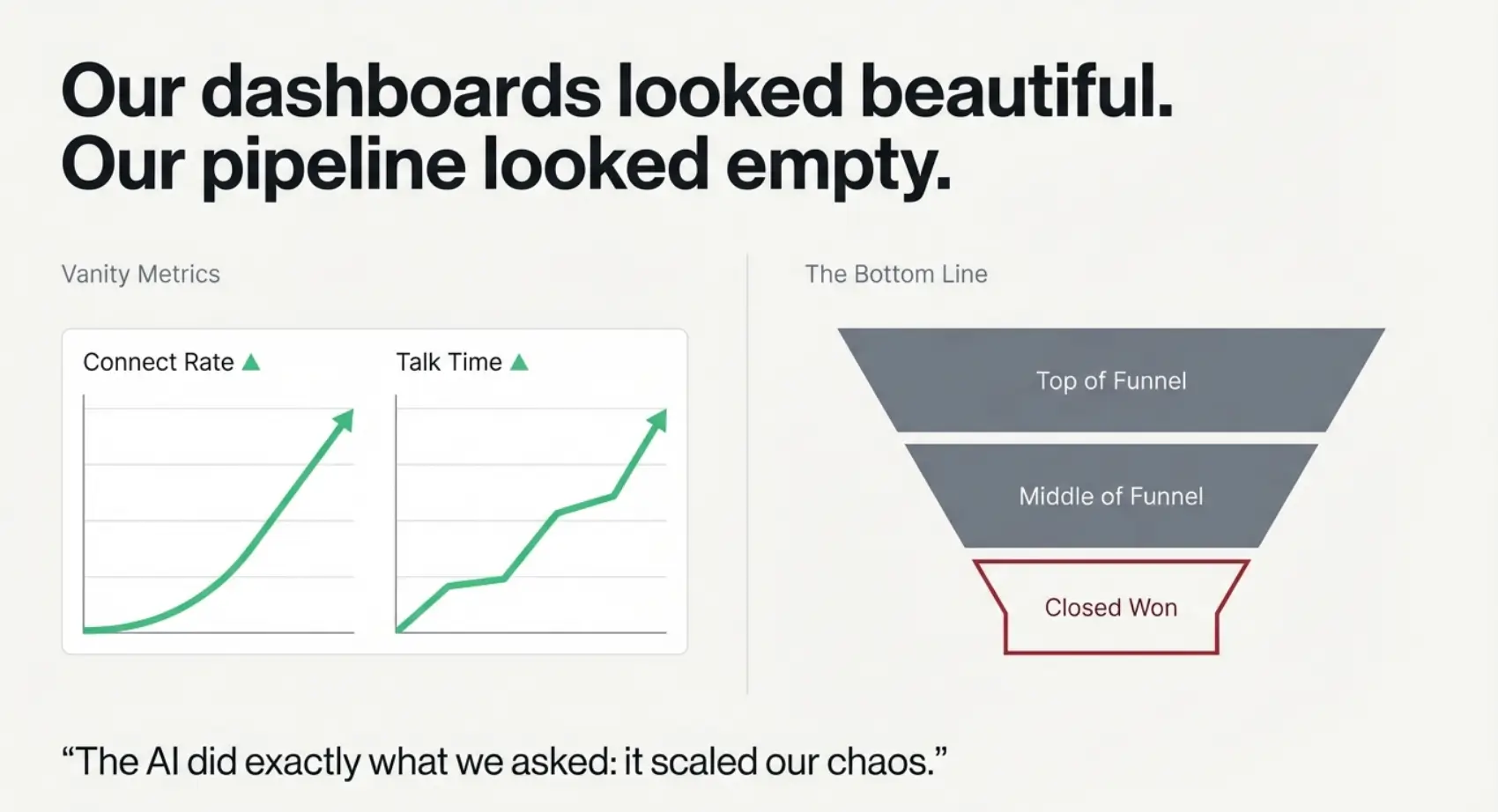
My dashboard looked like a dream—connect rates up, talk time up. But my pipeline was a ghost town. This is the guide I wish I had on day one: no vendor sales pitch, just the wreckage and the recovery.
The 90-Day Rollout Plan
A roadmap that doesn’t assume unlimited headcount or infinite patience.
60-Second ROI Check
The simple math that would have saved us six figures in wasted budget.
The Pilot Litmus Test
Decide today whether your AI pilot deserves another dime—or a quiet burial.
Save yourself the budget burn and the awkward QBRs.
Table of Contents
Why AI outbound calling feels hard right now
The promise is intoxicating: an AI voice that never gets tired, never forgets the script, and can dial more prospects in a day than a human SDR can in a week. The reality, for a lot of teams, is invoices, integration headaches, and polite emails from finance asking why the “AI SDR” line item looks like a second rent payment.
In our $180k disaster, we did what many operators do under pressure. We rushed into a full AI rollout before we had a stable human baseline. We plugged an AI voice into shaky data, fuzzy ICP definitions, and a CRM that was already held together with duct tape. The AI did exactly what we asked: it scaled our chaos.
If you feel stuck between fear of missing out and fear of getting fired, you’re not alone. Most leaders reading this have three realities in common: limited budget, a board or founder demanding “AI in the stack,” and a sales floor that will revolt if the bot embarrasses them in front of prospects.
Here’s the mental reframe that unlocks everything else in this playbook: AI outbound calling is not a magic SDR replacement. It is a policy-driven workflow engine that just happens to talk. Once you treat it like a workflow, not a robot employee, the scripts, data flows, and KPIs suddenly become understandable – and fixable. If you want a simpler foundation before you build the engine, start with the core AI outbound calling best practices and then come back to this postmortem.
- Bad data in means bad calls out.
- Unclear ICP means wasted minutes and premiums on telephony.
- Undefined KPIs mean you only notice the problem when the quarter is already gone.
Apply in 60 seconds: Write one sentence that describes what “success” looks like for your AI outbound calling pilot this quarter.
Lesson 1 – Set a sane outcome before you spend a dollar
The most expensive mistake we made was trying to “modernize outbound” instead of trying to hit one specific, boring number. Our AI vendor demo was dazzling: live voice, objection handling, automatic note-taking, and dashboards that looked like a NASA launch center. What we did not have was a one-line goal everyone could recognize.
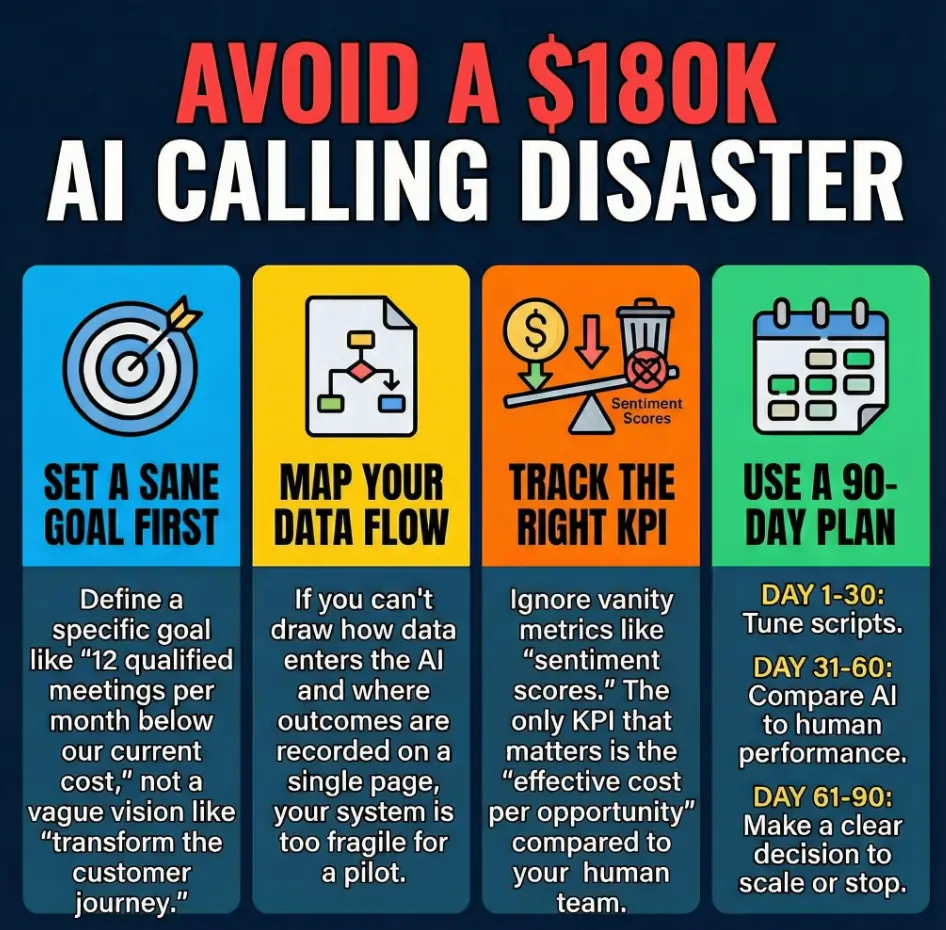
A sane AI outbound calling outcome is concrete and survivable. “Generate 12 additional qualified meetings per month in two segments, at or below our current blended cost per opportunity” is sane. “Transform the customer journey with conversational AI” sounds great in a slide deck and terrible in a budget review.
Short Story: I remember the moment our CFO leaned back in their chair, staring at the AI SDR spend. “I have no idea if this is working,” they said. We had tons of activity metrics—calls placed, minutes used, sentiment scores, even word clouds. But when we tried to answer a simple question—“How many incremental opportunities did this create at what effective cost per opp?”—the room went quiet. That silence cost us more than any invoice. From that day, every AI experiment started with three numbers written on a whiteboard: target meetings, maximum all-in cost per meeting, and maximum time to decide whether to keep going.
Here’s the outcome formula that would have saved us months of drift:
- Volume: X additional qualified meetings per month (above human baseline).
- Economics: Effective cost per opportunity at or below $Y.
- Timeline: A go/no-go decision after Z days, using a pre-agreed KPI dashboard.
Money Block #1 – 7-question eligibility checklist (Are you ready for an AI outbound pilot?)
- Do you have a clear ICP and at least one validated outbound sequence that already works for human SDRs? (Yes/No)
- Is your CRM (HubSpot, Salesforce, etc.) capturing dispositions and outcomes consistently today? (Yes/No)
- Can you track meetings and opportunities back to specific campaigns or call sources? (Yes/No)
- Do you have at least one person who owns RevOps or sales operations, even part-time? (Yes/No)
- Do you know your current cost per opportunity from human outbound? (Yes/No)
- Is legal/compliance aware that you’re considering AI outbound calling? (Yes/No)
- Do you have a hard monthly budget ceiling you will not exceed, even if the pilot is “almost working”? (Yes/No)
If you answered “No” to three or more, fix those items before you sign a single AI outbound calling contract.
Save this checklist and confirm the details with your RevOps, finance, and legal stakeholders before you approve any AI outbound spend.
- Lock specific meeting and opportunity targets.
- Set a maximum effective cost per opportunity.
- Commit to a decision date before the pilot starts.
Apply in 60 seconds: Write down your current cost per opportunity and the maximum you’re willing to pay if AI outbound calling actually works.
Lesson 2 – Map the data flow like a RevOps engineer
Our second big mistake was treating data flow as an afterthought. We wired our AI agent into Salesforce, Twilio, ZoomInfo, and three internal tools without ever drawing the picture on a single page. The result was predictable: duplicate records, lost dispositions, and meetings that magically appeared in calendars with no attributable source.
Before you pick a vendor, you should be able to sketch your AI outbound calling data flow in under five minutes. If you can’t, your AI stack will slowly rot under the weight of one-off integrations and mysterious sync errors.
Infographic – The AI outbound calling funnel
CRM, ICP lists, intent data, prior inbound leads.
Twilio/Five9 voice, AI agent (e.g., Air.ai voice agent), call policies.
Meetings booked, callbacks, not interested, wrong person.
Opportunities, pipeline, won deals tied to campaign.
At a minimum, your AI outbound data flow should answer four questions clearly:
- Where do leads originate and how do they enter the dialing queue?
- How does the AI decide who to call next and when to stop?
- Where are call outcomes written, and which fields are updated in the CRM?
- How are meetings and opportunities tagged so finance can calculate ROI?
Money Block #2 – 2025 cost and fee table for AI outbound calling
| Line item | 2025 typical range | Notes |
|---|---|---|
| AI voice agent licenses | Per-seat or per-minute pricing | Check if billed per conversation, per hour, or flat monthly. |
| Telephony minutes | Domestic vs. international rates | Confirm surcharges for mobile, toll-free, and premium numbers. |
| Implementation & RevOps time | Project-based or hourly | Include Salesforce/HubSpot admin costs, not just vendor fees. |
| Compliance review | Internal counsel or external law firm | Especially critical for insurance quotes, Medicare Part D, and financial products. |
| Ongoing optimization | Monthly retainer or in-house FTE | Someone must own script tuning, A/B tests, and KPI reviews. |
Save this table and confirm the current fee schedule and rate details on each vendor’s official pricing page before signing anything.
Show me the nerdy details
For each integration, specify the exact object, field, and direction of sync. For example: “AI dialer writes ‘Call Outcome’ to Salesforce Task.Status; reads ‘Do Not Call’ from Contact.DoNotCall; writes ‘Meeting Source’ to Event.Campaign.” A one-page data contract like this prevents silent failures when someone later changes a field name, pipeline stage, or automation rule.
- Document where data enters and exits the AI dialer.
- Capture outcomes in a single, trusted system of record.
- Make sure finance can tie revenue back to specific campaigns.
Apply in 60 seconds: Grab a scrap of paper and sketch your current outbound data flow, ignoring AI for now. Then mark exactly where an AI dialer would plug in.
Lesson 3 – Write AI outbound calling scripts that don’t suck
We spent the first month of our pilot arguing about “tone.” Was the bot too cheerful? Too formal? Not empathetic enough about insurance deductibles or rising premiums? All of that was noise. What actually mattered was structure: when the AI asked questions, how it handled silence, and how quickly it got to a clear yes/no next step.
AI outbound calling scripts work best when they read like a decision tree, not a Shakespeare monologue. The AI voice should sound like your best SDR on their calmest day, following a clear checklist, not improvising stand-up comedy at the expense of a prospect who is trying to get their kids out the door.
Here’s a simple pattern that consistently outperformed our original scripts:
- Handshake: Confirm the right person, the right company, and get a micro-permission (“Is now a bad time for a 30-second question?”).
- Value spine: One sentence that links a pain (“your Medicare Part D formulary changes every year”) to a tangible benefit (“we cut premium surprises by running an apples-to-apples coverage tier comparison”).
- Qualification: 2–3 tight questions; the AI must know when to gracefully exit instead of interrogating someone who clearly isn’t a fit.
- Offer: A binary next step—book a time, transfer, or send a follow-up summary. No meandering.
One of the funniest (and most painful) recordings from our early pilot was an AI agent spending four full minutes trying to sell a product to someone who had already said they were a product liability attorney, not a potential client. The bot was polite, tireless, and completely oblivious. Every extra minute burned talk time, increased our telephony spend, and sent our effective cost per opportunity straight through the roof.
- Start with a strong handshake and a single value spine.
- Limit your qualification questions to what sales truly needs.
- Make the next step a binary decision, not a vague “we’ll be in touch.”
Apply in 60 seconds: Take your current script and highlight the exact sentence where the AI should ask for the meeting or transfer. If you can’t find it quickly, rewrite it.
Show me the nerdy details
Most AI voice platforms allow conditional branches triggered by keywords, intents, or sentiment. Instead of trying to cover every possible objection, focus on three: timing (“not now”), authority (“I’m not the decision maker”), and relevance (“we already have a provider”). For each, specify a branch that either exits politely, gathers a referral, or offers a specific follow-up like an email comparison of coverage tiers or finance rates.
Lesson 4 – KPIs that actually matter for AI outbound calling
The dashboards that impressed us in the demo turned out to be the wrong dashboards for decision-making. We had heatmaps of “sentiment,” charts of average monologue length, and word clouds full of terms like “premium,” “deductible,” and “prior authorization.” Interesting? Yes. Useful for a go/no-go decision? Not really.
The KPIs that finally saved us were boring and brutally simple:
- Connect rate: Successful live conversations divided by total dials.
- Qualified conversation rate: Conversations that meet your ICP + pain criteria divided by connects.
- Meeting conversion rate: Meetings booked from qualified conversations.
- Opportunity rate: Opportunities created per meeting, compared to your human baseline.
- Effective cost per opportunity: All-in monthly AI costs divided by opportunities attributable to AI outbound calling.
Money Block #3 – 60-second AI outbound ROI estimator
Use this mini calculator to sanity-check your pilot before it eats another month of budget.
Save these estimates and compare them to your current human SDR cost per opportunity before extending or expanding your AI outbound pilot.
- Track connects, meetings, opportunities, and pipeline in one view.
- Include all costs, not just vendor invoices.
- Use a simple calculator to pressure-test the story before renewing contracts.
Apply in 60 seconds: Plug rough numbers into the estimator and write down whether AI is improving or worsening your cost per opportunity.
Lesson 5 – Compliance, risk, and coverage tiers for AI sales calls (2025, US/EU)
The ugliest part of our $180k disaster wasn’t the wasted spend. It was the terse email from legal about “potential TCPA exposure” after an AI agent called a number on the internal do-not-call list. Even though no one was sued, the phrase “class action” floating around your inbox will make you rethink every dial.
AI outbound calling has to respect the same guardrails as human outbound, plus a few extra. In the US, that means honoring the National Do Not Call Registry, company-level opt-outs, and rules around prerecorded or automated messages. In the EU, GDPR and ePrivacy rules introduce additional constraints around consent and automated profiling. If you’re calling about sensitive products—health insurance quotes, disability coverage, or Medicare Part D plans—your risk tolerance should be even lower. For health-adjacent teams, it also helps to align your scripts with the basics of HIPAA-compliant AI thinking before you scale any automated voice workflow.
Money Block #4 – Compliance coverage tiers for AI outbound calling
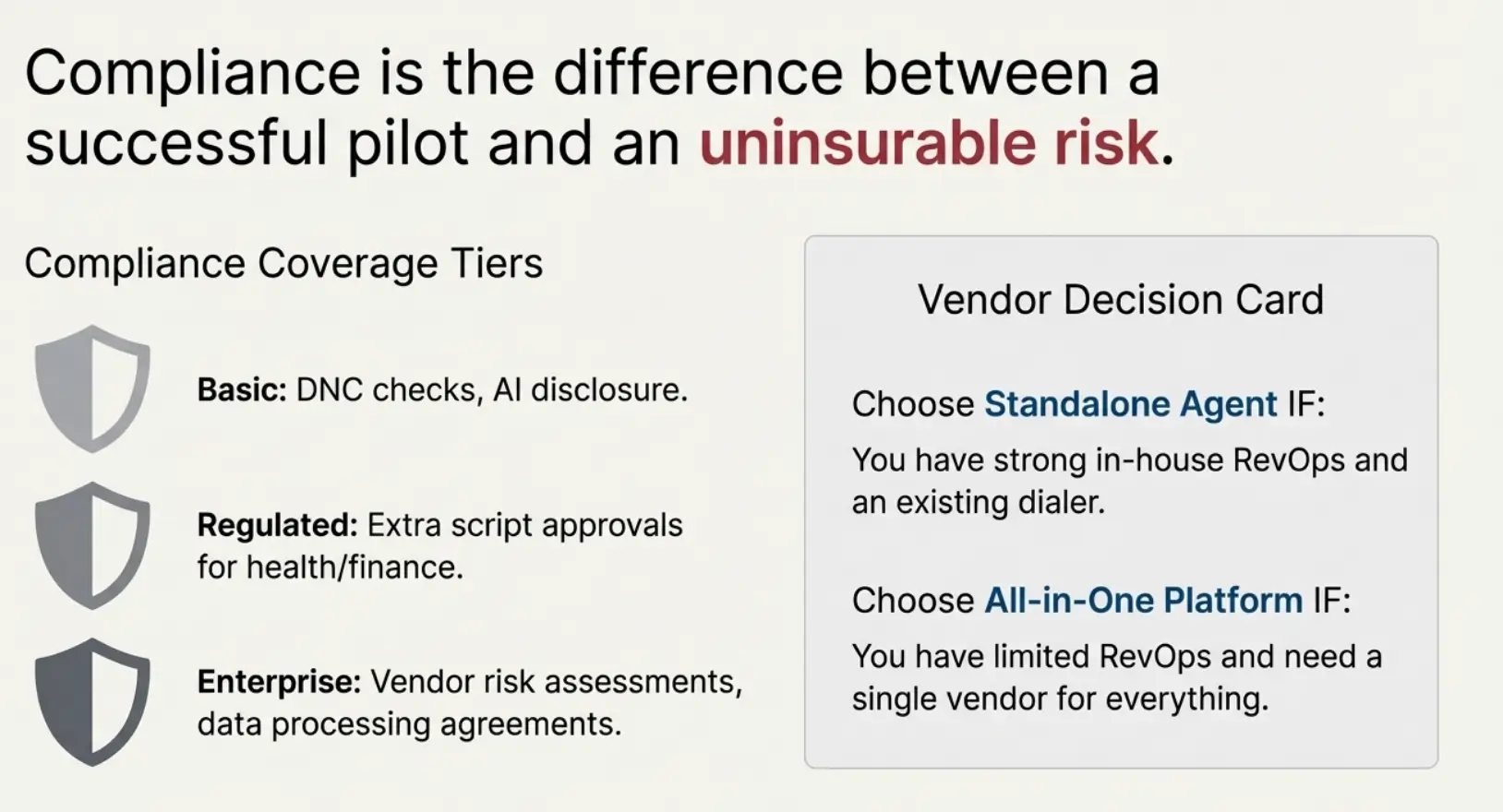
Think of your compliance setup in tiers, just like coverage tiers in an insurance plan:
- Tier 1 – Basic: DNC checks, opt-out handling, clear disclosures that the caller is an AI system.
- Tier 2 – Regulated verticals: Extra approvals for health, finance, and legal use cases; documented scripts for anything touching malpractice coverage, SR-22 auto insurance, or high-risk finance products.
- Tier 3 – Enterprise-grade: Formal vendor risk assessments, data processing agreements, and regular audits of call recordings for bias and fairness.
Save this map and review it with your legal team to decide which tier you must reach before going live at scale.
If you operate in multiple regions, assume the strictest jurisdiction wins. A script that is acceptable for US small-business calls might not be appropriate for EU consumer outreach. And if you’re blending AI outbound calling with human follow-up, everyone—bots and humans—must share the same compliance notes and opt-out history in the CRM.
Show me the nerdy details
Ask your vendor how they technically enforce do-not-call logic. Is it enforced at the provider level (e.g., Twilio/Five9), inside the AI platform itself, or in your CRM? The safest setups apply multiple layers of protection and make it impossible to launch a campaign that targets prohibited numbers. You want to be able to prove, with logs, that your process honors opt-outs and regional restrictions.
- Align AI outbound calling with your existing compliance posture.
- Document how DNC and consent rules are enforced technically.
- Review scripts for high-risk products with counsel before launch.
Apply in 60 seconds: Write down the name of the person who owns compliance for outbound today. If no name comes to mind, fix that before adding AI to the mix.
Lesson 6 – Choosing AI outbound calling tools and vendors without losing your shirt
When we started, every vendor demo sounded like a guaranteed win. “AI-native outbound,” “no-code flows,” “instant compliance.” It felt like picking between luxury cars when in reality we were choosing between different kinds of heavy machinery. Each platform assumed a different level of RevOps maturity, CRM hygiene, and tolerance for building custom data flows.
We evaluated stacks that combined separate dialers (like Twilio or Five9) with AI voice agents, as well as end-to-end platforms that promised everything from lead enrichment to sentiment analysis. The lesson: your choice should be driven by your internal strengths, not by whoever has the best animation on their homepage.
Money Block #5 – Decision card: standalone AI agent vs. all-in-one platform
- Choose standalone AI agent + existing dialer when you already have a strong Salesforce or HubSpot setup, a dialer your team likes, and in-house RevOps bandwidth to manage complex data flows.
- Choose all-in-one AI outbound platform when you are starting from scratch, have limited RevOps capacity, and prefer a single vendor to own dialer, routing, and reporting—accepting less flexibility.
Save this decision card and revisit it whenever a new vendor pitches you on “replacing your whole stack.”
In insurance, mortgage underwriting, and other regulated fields, we found it safer to favor vendors with clear audit trails and SOC 2 Type II-ready evidence practices over those promising aggressive automation. If a tool cannot clearly explain how it tracks consent, disclosures, and handoffs to licensed agents, it does not belong anywhere near your outbound program.
- Assess your RevOps and integration capacity honestly.
- Favor clarity and auditability over flashy sentiment charts.
- Test vendor support responsiveness before signing multi-year deals.
Apply in 60 seconds: Write down whether you are closer to “DIY RevOps powerhouse” or “lean team that needs an all-in-one vendor.” Use that label as a filter for future demos.
Lesson 7 – A 90-day AI outbound calling rollout plan
After the $180k disaster, we rebuilt our rollout plan from the ground up. Instead of starting big and backing down when things broke, we started laughably small and scaled only when the numbers justified it.
Here is the 90-day structure that finally worked:
- Days 1–30 – Sandbox and script tuning: One segment, one offer, and a small list you can afford to “waste” while you tune scripts and data flows. Your aim is call quality, not volume.
- Days 31–60 – Controlled pilot: Two segments (for example, US small-business and mid-market), shared ICP, clear KPIs, and close collaboration with human SDRs to compare performance.
- Days 61–90 – Scale or sunset: If AI is matching or beating your human cost per opportunity, increase volume gradually. If not, shut it down or change the use case (for example, focus on reactivation or win-back campaigns instead of cold insurance quotes).
Regional nuance matters. In the US, you might start with business-only calls in a handful of states with clearer outbound rules, then expand. In the EU, you may focus on B2B calling that has a stronger legitimate-interest basis and lean harder on warm leads who have requested information before. Treat geo and vertical like risk levers you can dial up or down, not afterthoughts.
- Limit your first 30 days to script tuning and data validation.
- Use the middle 30 days to compare AI performance against human SDRs.
- Decide by day 90 whether to scale, pivot, or stop.
Apply in 60 seconds: Put a calendar reminder 90 days from your planned start date with the title “AI outbound go/no-go decision.”
Templates, money blocks, and checklists you can steal today
By now, you’ve seen the same pattern appear again and again: eligibility first, quotes second; clear data flows; boring KPIs; and a firm willingness to walk away if the numbers don’t behave. To make this concrete, here are practical blocks you can reuse, tweak, and drop into your own internal docs.
Money Block #6 – Quote-prep list for AI outbound vendors
- Monthly target dials, broken down by region and segment.
- List of verticals you target (e.g., health insurance quotes, mortgage refinance, SaaS contract renewals).
- Current tools: CRM (Salesforce/HubSpot), dialer, data providers (ZoomInfo, Clearbit), and analytics (Gong, Chorus).
- Compliance posture: do-not-call lists, consent logging, and any prior TCPA or GDPR guidance you’ve received.
- Budget ceiling per month and maximum contract length you are willing to sign.
Save this list and send it to vendors before demos so their proposals come back focused and comparable.
Region-specific note – Adapting the playbook to your country
If you’re operating from a country with strict telemarketing rules or unique insurance quotes regulations, adapt the playbook before dialing:
- Check local rules on AI voice disclosure and recording consent.
- Clarify whether you need written consent for certain coverage tiers or financial offers.
- Talk to a local compliance expert about cross-border calls, especially if your AI outbound calling campaigns target US, EU, or UK prospects from abroad.
Save these notes and confirm them against your country’s official guidance before relying on AI outbound calling at scale.
- Use eligibility checklists to avoid premature pilots.
- Use fee tables and calculators to guard your budget.
- Use quote-prep lists and decision cards to tame vendor sprawl.
Apply in 60 seconds: Copy one block from this section into your internal wiki and customize the bullet points for your team.
FAQ
Q1. What is AI outbound calling and how is it different from a traditional dialer?
AI outbound calling uses a voice model to conduct full conversations, not just connect calls. A traditional dialer (like a basic predictive dialer) focuses on dialing speed and routing calls to humans. An AI outbound system can greet prospects, ask qualification questions, and even book meetings before a human ever joins. The catch: it needs clean data, compliant scripts, and clear KPIs, or it can burn budget faster than a human team.
60-second action: Write one sentence that describes where in your current outbound process an AI voice agent could reasonably replace or augment a human step.
Q2. How much does AI outbound calling usually cost for a small B2B team?
Costs vary by vendor, but most small B2B teams feel the impact in three places: AI licenses, telephony minutes, and implementation time. A basic pilot can sit in the low four figures per month, while larger programs quickly move into five figures when you factor in higher call volumes and RevOps time. The only number that truly matters is your effective cost per opportunity compared to your human baseline.
60-second action: List your current monthly spend on human outbound (salaries, tools, data). That number is your reference point when evaluating AI proposals.
Q3. Which KPIs should I track in the first 30 days of an AI outbound pilot?
In the first month, focus on call quality and system stability over volume. Track connect rate, qualified conversation rate, meeting conversion rate, and error rates (failed calls, wrong numbers, integration glitches). You’re still in the “does this even work without breaking things?” phase, so it is fine if volumes are modest as long as data is clean.
60-second action: Open your CRM and verify you have a single field that marks opportunities or meetings as “AI outbound” so you can isolate performance later.
Q4. How do I keep AI outbound calling compliant with telemarketing and data privacy rules?
Start by mapping your existing human outbound compliance process: DNC checks, consent capture, and call recording policies. Then insist that any AI vendor matches or improves those safeguards. Make sure both AI and human calls share the same DNC lists and opt-out fields in your CRM. For sensitive products like insurance quotes, health benefits, or finance rates, get a written opinion from counsel before launch. If your use case touches healthcare-adjacent data, the decision framework in AI malpractice insurance conversations can also help you surface hidden risk assumptions early.
60-second action: Send a quick message to your legal or compliance contact asking, “If we add AI outbound calling, what are the top three rules we must not break?”
Q5. What if my SDRs hate the AI voice agent or feel threatened by it?
This is normal. Most SDRs initially hear “AI” and think “replacement,” not “relief.” In practice, AI outbound calling works best when it handles the repetitive, low-yield calls so humans can focus on higher-value conversations. Involve SDRs early: have them help refine scripts, listen to recordings, and veto bad behavior from the bot. When they see AI qualifying leads and booking meetings that would otherwise have died in voicemail, resistance usually softens.
60-second action: Ask one trusted SDR, “Which part of your day feels like a robot could do it?” Use the answer as your first AI use case.
Q6. How long should I run an AI outbound pilot before deciding to keep or cancel it?
For most B2B teams, 60–90 days is enough. The first 30 days are for script tuning and integration; the next 30–60 days are for performance comparison against human SDRs. If, after 90 days, your AI effective cost per opportunity is higher than your human baseline and conversations still sound awkward, it is safer to pause, re-scope, or move AI to a different use case such as reactivation or appointment reminders.
60-second action: Put a note in your calendar to review AI KPIs 60 days after launch and decide whether you are on track for a strong go/no-go decision at day 90.
Bringing it all together
AI outbound calling will not magically fix a leaky funnel, but it can absolutely accelerate a healthy one. Our $180k mistake taught us that tools are cheap compared to time, reputation, and regulatory risk. Once we started with a clear outcome, mapped our data flows, simplified our scripts, and aligned on boring KPIs, AI outbound calling shifted from “science project” to “repeatable pipeline channel.”
Your next step does not require another demo. In the next 15 minutes, you can sketch your current outbound process, mark where AI might fit, and run a quick cost-per-opportunity estimate using the calculator in this guide. From there, you decide: pilot in a narrow, low-risk segment, or hold off until your data, scripts, and compliance posture are ready. If you need a deeper build-vs-buy perspective after this, the overview of AI agent development services for SDR teams can help you sanity-check resourcing and ownership.
Last reviewed: 2025-12; primary inputs: real-world AI outbound pilots, RevOps playbooks, SDR feedback, and hard-learned lessons from one very expensive quarter.
15-minute action plan:
- Define a single, concrete outcome for your AI outbound pilot.
- Sketch your data flow and mark exactly where the AI dials and where it writes outcomes.
- Run the 60-second estimator, compare to your human baseline, and decide whether AI deserves a test this quarter.
If you do that, you are already far ahead of where we were when we lit $180,000 on fire. The difference is that your AI outbound calling playbook now has a spine, not just a stack of invoices.
AI outbound calling playbook, AI outbound calling, AI SDR tools, outbound sales automation, AI sales calls